Buying an ergonomic chair? Read this before you spend. A chair is often the single most expensive item in a home office, and it is the one you sit in for hours. A few minutes spent on fit, return policies, and what adjustability actually means can save you from an expensive mismatch.
What You Must Decide First
Before comparing models, settle four things that shape every other decision.
- Your budget range. Ergonomic chairs in Singapore start from around $120–150 and go past $1,000. A higher price can reflect better materials and longer warranty, but it does not automatically mean a better fit for your body.
- How many hours you actually sit. If you are at a desk for six or more hours a day, adjustability becomes important. For occasional use — an hour here and there — a simpler chair may work perfectly well.
- Your body dimensions. Height, weight, and leg length affect which seat depth, backrest height, and weight capacity you need. A chair that fits someone 170 cm tall may not suit someone 185 cm.
- Your actual need — not the marketing promise. Are you looking for better comfort during long sessions, or are you responding to a label that says “ergonomic”? Be honest about the problem you are trying to solve.
Hidden Costs and Realities
The sticker price is rarely the full story. These practical factors can add cost, time, and frustration.
- Delivery and assembly. Ergonomic chairs ship in large, heavy boxes. Some retailers charge extra for doorstep delivery; others include it. Assembly usually takes 20–40 minutes with the included tools, but a heavy base and gas lift can be awkward to handle solo.
- Warranty length and what it covers. Check whether the warranty covers the gas lift, armrests, mesh, and casters separately — some warranties cover the frame for years but the moving parts for far less. A chair with a 5-year frame warranty and a 1-year gas-lift warranty is not a “5-year chair.”
- Return and exchange policy. A large, assembled chair is difficult to repack and return. Some sellers charge a restocking fee (often 10–20%) and require original packaging. Know the return window and conditions before you buy, especially if you are ordering online without trying the chair first.
- Long-term cost per year. A $400 chair with a 2-year warranty effectively costs $200 per year of coverage. A $600 chair with a 5-year warranty costs $120 per year. The cheaper upfront price is not always the cheaper long-term choice.
Compatibility and Fit Traps
A chair can be well-built and still be wrong for you. These are the most common mismatches.
- Seat depth vs your thigh length. If the seat pan is too deep, the front edge presses behind your knees and you end up slouching to relieve the pressure. If it is too shallow, you lose thigh support. A good fit leaves about two to three fingers of clearance between the front edge and the back of your knee when you sit all the way back.
- Armrest reach and height. Fixed armrests that sit too high force your shoulders up; too low and they offer no support. If your arms naturally rest on your desk, you may not need armrests at all. Adjustable armrests — especially those that move in and out as well as up and down — are useful if you type with your forearms parallel to the floor.
- Lumbar support position. A lumbar curve that hits the wrong spot can feel worse than none. Look for lumbar support you can adjust in height and depth, not just a fixed bulge. What fits one person’s lower back may dig into another’s.
- Weight limit and build. Every chair has a stated weight capacity — often around 120–150 kg for mainstream ergonomic models. Exceeding it can shorten the life of the gas lift and the mechanism. Check the spec sheet, not just the product photos.
What Not to Overvalue
Some features sound important but matter less in daily use than they appear on a product page.
- Marketing labels. Terms like “executive,” “pro,” “premium,” and even “ergonomic” itself have no universal standard. Focus on the actual adjustability the chair offers, not the adjective on the box.
- Office vs gaming chairs. Gaming chairs often look more supportive with their high wings and aggressive bolsters, but those same wings can restrict shoulder movement during typing. A quiet-looking mesh office chair may offer more usable adjustability. Judge by function, not aesthetics.
- Price as a proxy for fit. A $900 chair that does not adjust to your height is a worse choice than a $200 chair that does. Price often reflects materials and warranty; it does not measure how well the chair fits your body.
- Headrests. A headrest is useful if you recline often, but if you sit upright most of the day, it may never touch your head. Do not pay extra for a feature you will not use.
The Rise of Ergonomic Claims — What They Really Mean
The number of chairs labelled “ergonomic” has grown sharply, and the term now covers everything from entry-level mesh chairs to high-end task seating used in corporate offices. Because there is no single authority that certifies what “ergonomic” means for consumer chairs, the label alone tells you very little.
What separates a genuinely useful chair from one that simply wears the label is adjustability. A chair with a gas-lift height adjustment, a tilting backrest you can lock, a lumbar support you can move up and down, and armrests you can reposition gives you the ability to shape the chair to your body. A chair labelled “ergonomic” with only a height lever and a fixed backrest gives you very little of that control.
When reading a product description, translate the marketing into a short checklist: can I change the seat height? The backrest angle? The lumbar position? The armrest height? If the answer to most of those is no, the chair is probably not giving you what the word “ergonomic” promises.
A Fit-Check Checklist Before You Buy
Take five minutes with a tape measure and your current desk before ordering. These measurements give you a reference to compare against the chair’s published specifications.
- Back of knee to floor: sit with your feet flat and measure from the floor to the crease behind your knee. The chair’s minimum seat height should be at or below this number.
- Elbow height at your desk: sit at your desk in your usual typing position and measure from the floor to your elbow. The chair’s armrest height range should bracket this number.
- Back of knee to lower back: measure along the seat from behind your knee to the small of your back. This is your ideal seat depth. Add about 3–5 cm of clearance to avoid pressure behind the knees.
- Desk surface height: measure from the floor to the top of your desk. Your chair’s seat-height range plus your seated torso height should let your forearms rest near horizontal.
- Your weight: compare against the chair’s stated maximum. Stay comfortably under the limit.
- Shoulder width: if you are broad-shouldered, check the backrest width — a narrow back can feel confining over hours.
If the chair you are considering publishes a seat-height range, a seat-depth measurement, an armrest adjustment range, and a weight capacity, you can cross-reference all of these numbers. If a product page does not list these specs, ask the seller before buying.
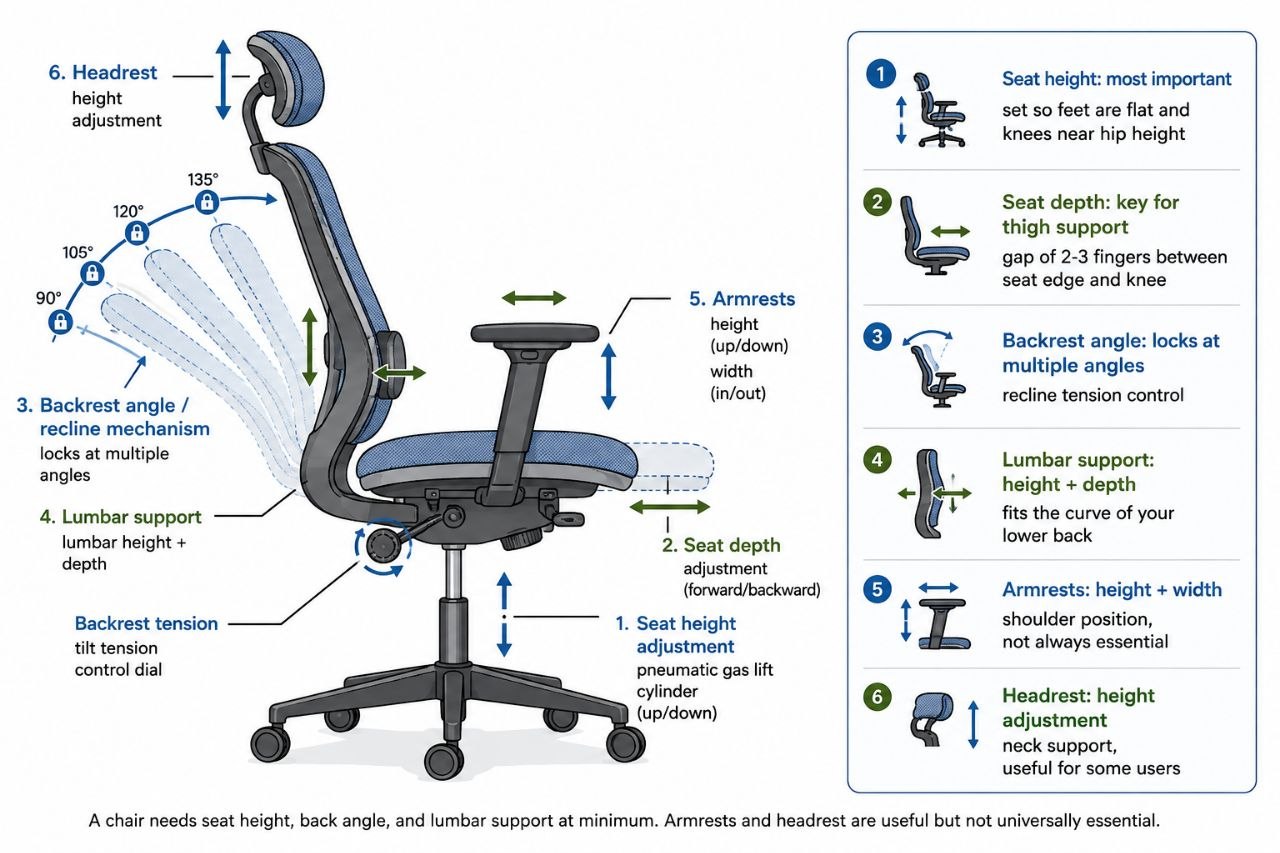
An Example of What Adjustability Looks Like
To make the adjustability features described above more concrete, a typical high-back mesh ergonomic chair is a common reference point in the category. It pairs a breathable mesh back with a padded cushion, a sturdy five-star base, a gas-lift seat-height adjustment, a tilt mechanism with tension control and lock, a headrest, and a lumbar pillow you can move up, down, and forward to match the curve of your lower back.
In this class of chair, a typical model is often priced around $120–150 and rated for a weight capacity of approximately 150 kg. The adjustable lumbar support and reclining backrest are the features you are paying for over a fixed regular chair, and they matter most when you sit for several hours and want to vary your posture — sitting upright for focused work, reclining slightly for reading or calls.
This is an illustration of the category, not a recommendation of a single model. HemiLife’s ergonomic chair collection includes several models across different price points, each with its own adjustment range and specifications. The right one for you depends on your measurements from the checklist above.
How We Avoided the Chair-Category Trap
Many chair comparisons start with a ranking and work backward into reasons. We did the opposite: we started from the questions that actually decide whether a chair fits a body and a budget, then described where the evidence is thin and where marketing oversells. The caution ledger above is the real meat – if a chair does not survive those checks, a review score will not save it.
If desk height or legroom is the real issue, an under-desk footrest may be the more practical fix – see our guide on when a footrest actually helps.
Related Guides
Pair your chair with the Complete Ergonomic Home Office Setup Guide, compare the ergonomic mouse vs a regular mouse, see how a standing desk converter fits into a sit-stand routine, or explore a budget home office under USD 200.