Category: Ergonomic Setups

Ergonomic workspace product guides and setup recommendations.

  • Do You Need an Under-Desk Footrest? How to Tell

    Do you actually need an under-desk footrest? Honest answer: not everyone does. If your feet already rest flat on the floor with your knees near hip height and you feel comfortable throughout the day, a footrest probably will not change anything for you. But if your feet dangle, your chair is a little too high, or you shift restlessly after a few hours, a footrest is one of the simplest and cheapest ergonomic upgrades you can make — and this guide will help you decide whether to spend or skip.

    The Honest Case for Owning One

    A footrest does not correct your posture on its own. What it does is give your feet a stable, comfortable surface so you can keep your hips and knees in a more neutral position. When your feet are planted properly, your body tends to sit in a more balanced way, which can reduce the urge to slouch or slide forward.

    You are more likely to benefit from a footrest if any of these sound familiar:

    • Your feet do not reach the floor comfortably when you sit back in your chair.
    • You find your feet dangling, or you tuck them under your chair out of habit.
    • Your desk is tall enough that your knees sit below hip level.
    • You tend to cross your legs, rock, or shift restlessly for most of the day.
    • You spend long, continuous hours at your desk and want to vary your leg position.

    For most people the real benefit is comfort. Sitting with your feet unsupported, especially if you are shorter or your chair seat is a little high, can leave your lower back and thighs feeling tired by the end of the day. A footrest can help you keep a more relaxed leg position when your feet do not reach the floor, and it lets you change your leg position now and then — which is generally good for staying comfortable during long sessions.

    The Honest Case Against — When It Is Probably a Waste

    A footrest does not add value to every desk setup. Here is when you can safely skip it:

    • Your feet rest fully flat on the floor and your knees sit at roughly 90 degrees.
    • You already feel comfortable and do not find yourself shifting or fidgeting for support.
    • Your chair height and desk height already match your body well without extra help.
    • You are happy with your current arrangement and do not think about your feet at all — that is a good sign.

    If you check all of these, buying a footrest is unlikely to improve your comfort. The goal is simply to find a position where your feet are supported and your legs are comfortable — and if you already have that, there is nothing to fix.

    Cheaper or Free Alternatives to Try First

    Before spending money, it is worth trying something you probably already have at home. A footrest does not need to be a purpose-built product to help you figure out whether the idea works for you.

    • A sturdy box or a stack of books. Place it under your desk and rest your feet on it. If it brings your knees closer to hip height and you feel more comfortable, a real footrest may be worth buying.
    • An angled stack. Tilt a book or a small board against a box to create a slight incline. This simulates the angled surface many footrests provide and lets you test whether a tilt helps.
    • A rolled towel. Place a firmly rolled towel under your desk and rest the arches of your feet on it. It is not a long-term solution, but it gives you a quick sense of whether elevation helps.

    These experiments cost nothing and take five minutes. If they make a noticeable difference, a proper footrest is likely worth it. If they do nothing for you, you have just saved yourself the purchase.

    If You Do Need One: Fixed-Angle vs Adjustable Height

    Footrests come in two broad types, and the difference matters for how well one will suit you.

    Fixed-Angle Footrests

    These are the simplest and often the cheapest options. A fixed footrest is angled in one position and expects your feet to rest at that angle. If that angle suits your height and chair, they work well and stay out of the way. They typically suit people who use the same chair at the same desk every day and already know roughly what height and tilt they need.

    The trade-off is that you cannot change the position if it does not match your setup. If you share the desk, switch between sitting positions, or find the ideal angle changes through the day, a fixed model may not give you enough flexibility.

    Adjustable Footrests

    Adjustable models let you change the height and usually the tilt, so you can dial in a position that matches your chair and desk. They cost a little more, but they are more forgiving if you share the desk, switch between sitting positions, or find the ideal angle changes through the day.

    Within the adjustable category you will often see two features worth understanding: a range of height settings and a tilting top that you can raise or lower. These let you match the footrest to your own legs rather than adjusting to a fixed design. If you are unsure which angle will work, an adjustable model is the safer bet.

    Tiered Buying: What Each Price Level Realistically Buys
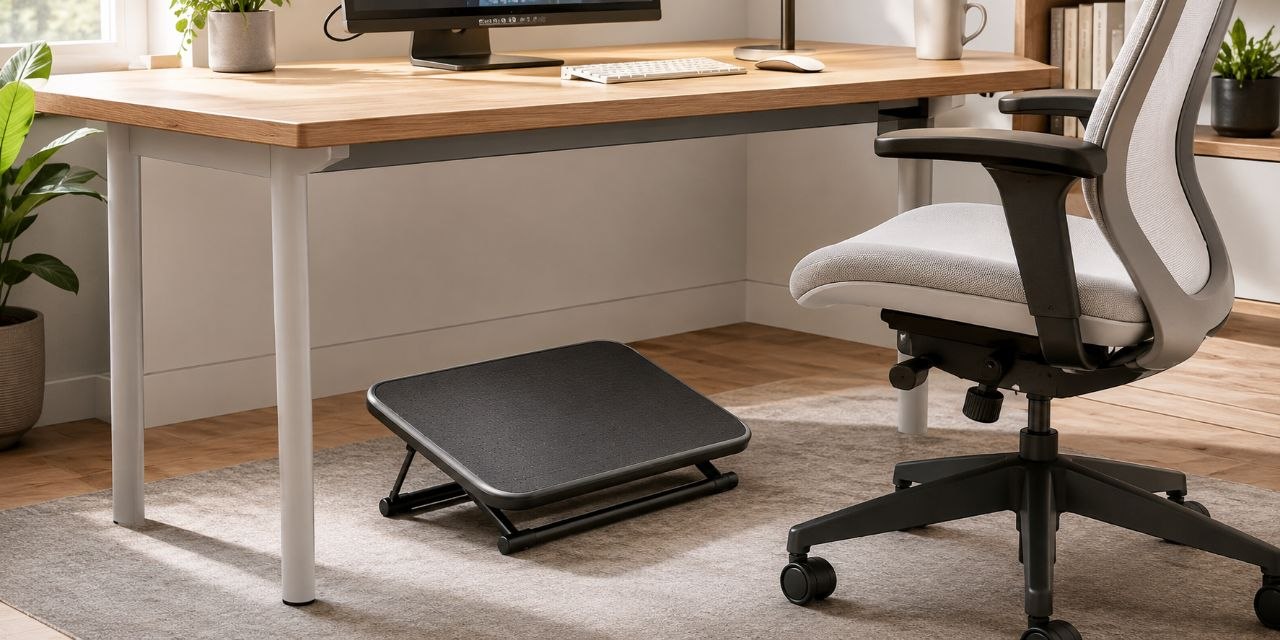
    Under-desk footrest close-up with angled textured platform, adjustable height and tilt, and a compact under-desk footprint.

    Footrest prices span a wide range, and what you get at each level is fairly predictable. Here is what to expect at each tier.

    Budget Tier (Typically Around $20–35)

    At this level you get a fixed-angle foam or basic plastic footrest. It usually has a textured top surface for grip and a single fixed tilt. Height adjustment is minimal or absent. These work fine if you already know the angle you need and your chair height does not change. Do not expect adjustability or premium materials — you are paying for a stable angled platform and not much else.

    Mid-Range Tier (Typically Around $35–55)

    This is where adjustable footrests start to appear. A typical mid-range model is built from high-impact plastic, gives you a few height settings plus a top that tilts, and includes a textured or ridged surface so your feet do not slip. The compact footprint makes it easy to slide under most desks and store away. This tier covers most home-office needs: you get enough adjustability to match different chair heights and sitting positions without spending a lot.

    Premium Tier (Typically $60 and Above)

    Premium footrests tend to offer a wider platform, finer height and angle adjustments, and sometimes a rocker-style base that lets you tilt your feet back and forth — which some people find helpful for staying active while seated. Build quality steps up: thicker materials, more robust adjustment mechanisms, and surfaces designed to hold up under daily use. These are worth considering if you spend long hours at your desk every day and want the most flexibility, or if a cheaper model has not felt quite right.

    Most people will find the mid-range tier hits the sweet spot — enough adjustability to get comfortable, without paying for features they may not use.

    What to Look for When Choosing

    Once you have narrowed down the type and tier, a few details help separate a footrest that works from one that sits unused.

    Height Range

    Look for a footrest that can adjust to a height you actually need, not just one that looks adjustable. A typical compact footrest offers several height settings, and the total range matters more than any single number. The range should be enough to bring your knees near hip level when your feet are resting on it.

    Angle Adjustment

    Being able to tilt the top surface is useful because a completely flat footrest rarely matches how most people sit. A slight tilt can encourage a more natural foot position, and many find it more comfortable. If you can adjust the angle, you can find the setting that works rather than accepting whatever the fixed design gives you.

    Traction and Grip

    A textured top surface keeps your feet from slipping, which is more important than it sounds. A smooth plastic surface can let your feet slide, which then makes you shift and lose the stable position you added the footrest for. A grippy or textured surface keeps your feet planted.

    Size and Fit

    Make sure the footrest fits comfortably under your desk and does not force you to sit further back than you would like. A very wide model can be awkward in a small setup, while a very narrow one may not give both feet a comfortable resting surface.

    Build Quality

    Because a footrest takes your weight and is kicked around under a desk, a sturdy design matters. High-impact plastic is common and works well for a compact model. Check that the adjustment mechanism feels solid rather than flimsy, and that the footrest does not shift when you rest your feet on it.

    How to Set It Up Correctly

    Once you have a footrest, a little setup goes a long way.

    • Place it so your feet rest on it with your knees roughly at hip height or slightly below.
    • Adjust the tilt so your heels rest slightly ahead of your toes, in a natural position.
    • Try a few height and angle settings, and pick the one that feels most stable for more than a few minutes.
    • Change your leg position occasionally. A footrest supports change, not a locked-in pose.

    The aim is a comfortable, planted position you can hold without fidgeting. If the footrest does not let you reach that after trying a few settings, it may not match your body — try the height and angle adjustments before you settle on the purchase.

    How a Footrest Fits Into Your Overall Setup

    A footrest is one piece of a larger ergonomic picture. It works alongside a chair and desk that suit your height, and it is not a replacement for getting up and moving during the day. If you are still adjusting the rest of your workspace, it can help to settle your chair and monitor first, then add a footrest for the final level of comfort.

    For a fuller view of the wider setup, our guide to a complete ergonomic home office setup covers the chair, desk, and screen together. If your chair height is the reason your feet do not reach the floor, our guidance on an ergonomic chair vs a regular chair is also worth a look before you spend on a footrest.

    How We Kept the Footrest Question Honest

    Footrests are easy to over-sell because they are small and cheap and everyone has a foot that touches the floor sometimes. We deliberately started from the necessity question: do you actually need one? That framing keeps the article from drifting into “buy this because it is ergonomic” territory. Where the evidence is thin — for example, how much a footrest improves posture for someone who is not already uncomfortable — we say so instead of papering over it.If the issue is more about your chair than your feet, see our ergonomic chair vs regular chair guide for the bigger seating decision.
  • Ergonomic Chair vs Regular Chair: What to Check Before You Buy

    Buying an ergonomic chair? Read this before you spend. A chair is often the single most expensive item in a home office, and it is the one you sit in for hours. A few minutes spent on fit, return policies, and what adjustability actually means can save you from an expensive mismatch.

    What You Must Decide First

    Before comparing models, settle four things that shape every other decision.

    • Your budget range. Ergonomic chairs in Singapore start from around $120–150 and go past $1,000. A higher price can reflect better materials and longer warranty, but it does not automatically mean a better fit for your body.
    • How many hours you actually sit. If you are at a desk for six or more hours a day, adjustability becomes important. For occasional use — an hour here and there — a simpler chair may work perfectly well.
    • Your body dimensions. Height, weight, and leg length affect which seat depth, backrest height, and weight capacity you need. A chair that fits someone 170 cm tall may not suit someone 185 cm.
    • Your actual need — not the marketing promise. Are you looking for better comfort during long sessions, or are you responding to a label that says “ergonomic”? Be honest about the problem you are trying to solve.

    Hidden Costs and Realities

    The sticker price is rarely the full story. These practical factors can add cost, time, and frustration.

    • Delivery and assembly. Ergonomic chairs ship in large, heavy boxes. Some retailers charge extra for doorstep delivery; others include it. Assembly usually takes 20–40 minutes with the included tools, but a heavy base and gas lift can be awkward to handle solo.
    • Warranty length and what it covers. Check whether the warranty covers the gas lift, armrests, mesh, and casters separately — some warranties cover the frame for years but the moving parts for far less. A chair with a 5-year frame warranty and a 1-year gas-lift warranty is not a “5-year chair.”
    • Return and exchange policy. A large, assembled chair is difficult to repack and return. Some sellers charge a restocking fee (often 10–20%) and require original packaging. Know the return window and conditions before you buy, especially if you are ordering online without trying the chair first.
    • Long-term cost per year. A $400 chair with a 2-year warranty effectively costs $200 per year of coverage. A $600 chair with a 5-year warranty costs $120 per year. The cheaper upfront price is not always the cheaper long-term choice.

    Compatibility and Fit Traps

    A chair can be well-built and still be wrong for you. These are the most common mismatches.

    • Seat depth vs your thigh length. If the seat pan is too deep, the front edge presses behind your knees and you end up slouching to relieve the pressure. If it is too shallow, you lose thigh support. A good fit leaves about two to three fingers of clearance between the front edge and the back of your knee when you sit all the way back.
    • Armrest reach and height. Fixed armrests that sit too high force your shoulders up; too low and they offer no support. If your arms naturally rest on your desk, you may not need armrests at all. Adjustable armrests — especially those that move in and out as well as up and down — are useful if you type with your forearms parallel to the floor.
    • Lumbar support position. A lumbar curve that hits the wrong spot can feel worse than none. Look for lumbar support you can adjust in height and depth, not just a fixed bulge. What fits one person’s lower back may dig into another’s.
    • Weight limit and build. Every chair has a stated weight capacity — often around 120–150 kg for mainstream ergonomic models. Exceeding it can shorten the life of the gas lift and the mechanism. Check the spec sheet, not just the product photos.

    What Not to Overvalue

    Some features sound important but matter less in daily use than they appear on a product page.

    • Marketing labels. Terms like “executive,” “pro,” “premium,” and even “ergonomic” itself have no universal standard. Focus on the actual adjustability the chair offers, not the adjective on the box.
    • Office vs gaming chairs. Gaming chairs often look more supportive with their high wings and aggressive bolsters, but those same wings can restrict shoulder movement during typing. A quiet-looking mesh office chair may offer more usable adjustability. Judge by function, not aesthetics.
    • Price as a proxy for fit. A $900 chair that does not adjust to your height is a worse choice than a $200 chair that does. Price often reflects materials and warranty; it does not measure how well the chair fits your body.
    • Headrests. A headrest is useful if you recline often, but if you sit upright most of the day, it may never touch your head. Do not pay extra for a feature you will not use.

    The Rise of Ergonomic Claims — What They Really Mean

    The number of chairs labelled “ergonomic” has grown sharply, and the term now covers everything from entry-level mesh chairs to high-end task seating used in corporate offices. Because there is no single authority that certifies what “ergonomic” means for consumer chairs, the label alone tells you very little.

    What separates a genuinely useful chair from one that simply wears the label is adjustability. A chair with a gas-lift height adjustment, a tilting backrest you can lock, a lumbar support you can move up and down, and armrests you can reposition gives you the ability to shape the chair to your body. A chair labelled “ergonomic” with only a height lever and a fixed backrest gives you very little of that control.

    When reading a product description, translate the marketing into a short checklist: can I change the seat height? The backrest angle? The lumbar position? The armrest height? If the answer to most of those is no, the chair is probably not giving you what the word “ergonomic” promises.

    A Fit-Check Checklist Before You Buy

    Take five minutes with a tape measure and your current desk before ordering. These measurements give you a reference to compare against the chair’s published specifications.

    • Back of knee to floor: sit with your feet flat and measure from the floor to the crease behind your knee. The chair’s minimum seat height should be at or below this number.
    • Elbow height at your desk: sit at your desk in your usual typing position and measure from the floor to your elbow. The chair’s armrest height range should bracket this number.
    • Back of knee to lower back: measure along the seat from behind your knee to the small of your back. This is your ideal seat depth. Add about 3–5 cm of clearance to avoid pressure behind the knees.
    • Desk surface height: measure from the floor to the top of your desk. Your chair’s seat-height range plus your seated torso height should let your forearms rest near horizontal.
    • Your weight: compare against the chair’s stated maximum. Stay comfortably under the limit.
    • Shoulder width: if you are broad-shouldered, check the backrest width — a narrow back can feel confining over hours.

    If the chair you are considering publishes a seat-height range, a seat-depth measurement, an armrest adjustment range, and a weight capacity, you can cross-reference all of these numbers. If a product page does not list these specs, ask the seller before buying.

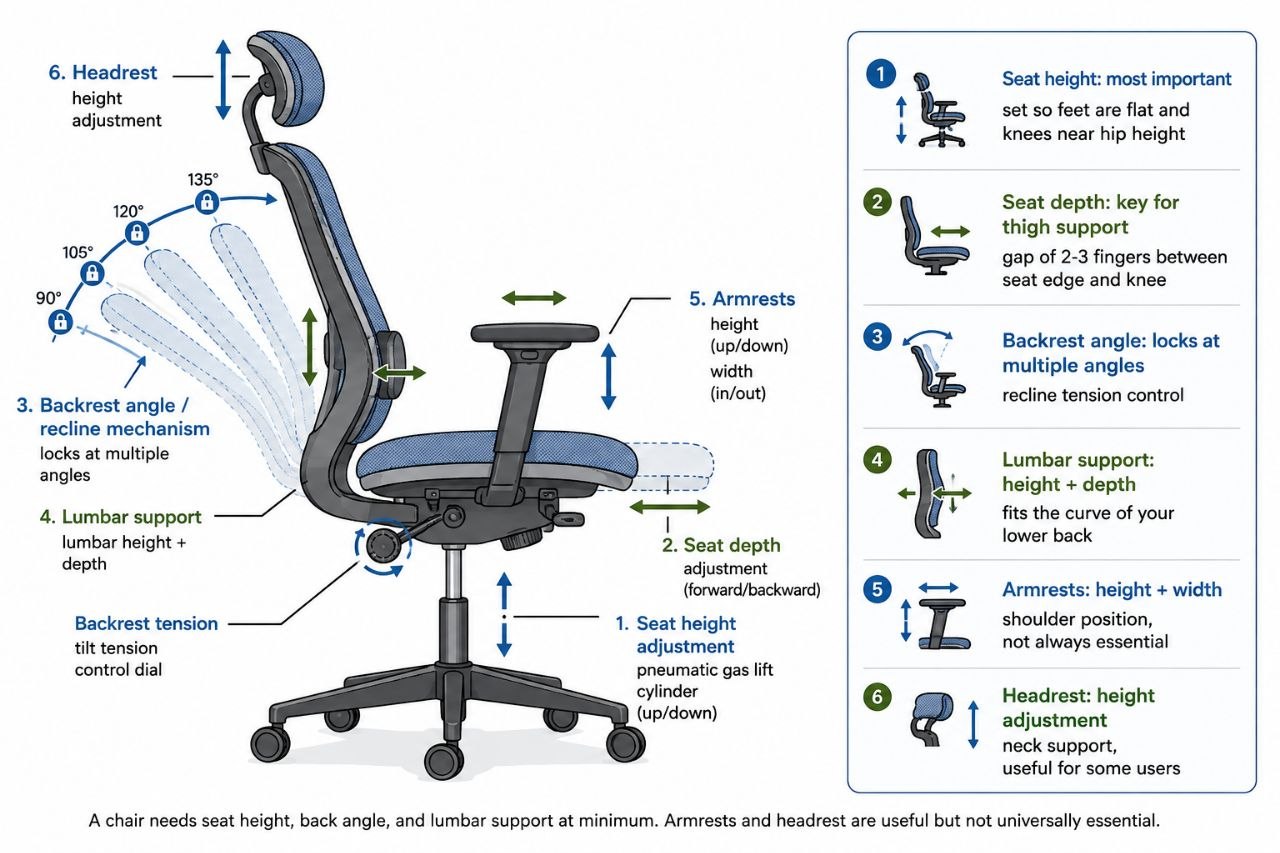
    Ergonomic office chair adjustability diagram: seat height, depth, backrest angle, lumbar support, armrests, and headrest.

    An Example of What Adjustability Looks Like

    To make the adjustability features described above more concrete, a typical high-back mesh ergonomic chair is a common reference point in the category. It pairs a breathable mesh back with a padded cushion, a sturdy five-star base, a gas-lift seat-height adjustment, a tilt mechanism with tension control and lock, a headrest, and a lumbar pillow you can move up, down, and forward to match the curve of your lower back.

    In this class of chair, a typical model is often priced around $120–150 and rated for a weight capacity of approximately 150 kg. The adjustable lumbar support and reclining backrest are the features you are paying for over a fixed regular chair, and they matter most when you sit for several hours and want to vary your posture — sitting upright for focused work, reclining slightly for reading or calls.

    This is an illustration of the category, not a recommendation of a single model. HemiLife’s ergonomic chair collection includes several models across different price points, each with its own adjustment range and specifications. The right one for you depends on your measurements from the checklist above.

    How We Avoided the Chair-Category Trap

    Many chair comparisons start with a ranking and work backward into reasons. We did the opposite: we started from the questions that actually decide whether a chair fits a body and a budget, then described where the evidence is thin and where marketing oversells. The caution ledger above is the real meat – if a chair does not survive those checks, a review score will not save it.

    If desk height or legroom is the real issue, an under-desk footrest may be the more practical fix – see our guide on when a footrest actually helps.

    Related Guides

    Pair your chair with the Complete Ergonomic Home Office Setup Guide, compare the ergonomic mouse vs a regular mouse, see how a standing desk converter fits into a sit-stand routine, or explore a budget home office under USD 200.

  • Standing Desk Converter vs Full Standing Desk: Which Fits Your Desk

    Standing Desk Converter vs Full Standing Desk: Which Fits Your Desk

    Last updated: August 2026 · Written by Hemi

    Two Routes, One Question

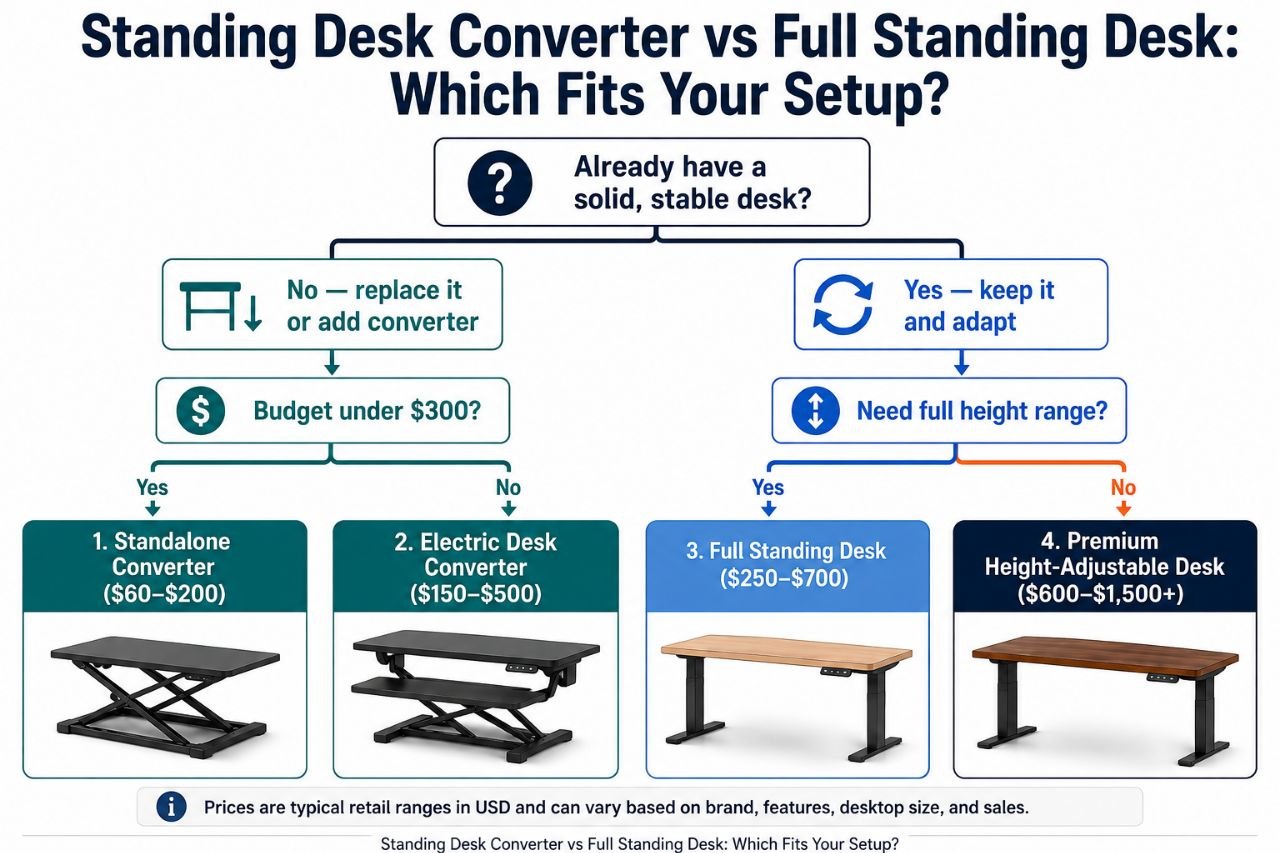
    When you want a sit/stand workstation, you are really choosing between two routes: adding height adjustment to the desk you already own, or starting fresh with a desk built for the job. Neither route is universally better — which one fits depends on your current desk, your space, your budget, and how you work.

    This guide walks through both paths as a decision tree so you can follow the branch that describes your situation, check the right things, and land on a sensible choice.

    First: Keep Your Desk or Replace It?

    The first fork is the simplest one. Ask yourself:

    • Is your existing desk structurally sound, flat, and deep enough for your setup?
    • Do you want to keep it — for sentimental reasons, because it matches the room, or because it was a considered purchase?
    • Are you happy with the surface area it gives you?

    If the answer to all three is yes, you are likely in Branch A — add a standing desk converter on top. If your desk is wobbly, too small, the wrong height, or you simply want a clean-sheet workstation, you are in Branch B — a full standing desk replaces it entirely.

    Still unsure? Work through both branches below before deciding.

    Branch A: Keep Your Existing Desk → Standing Desk Converter

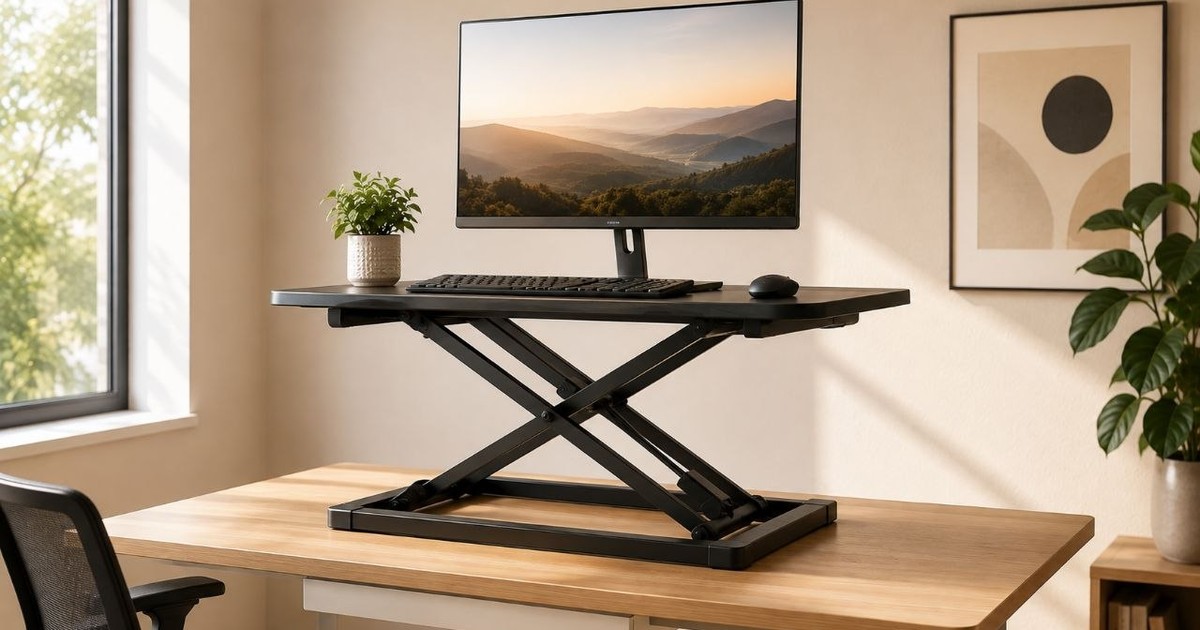
    A standing desk converter (sometimes called a desk riser) sits on top of your current desk and lifts your monitor, keyboard, and mouse to standing height. The desk underneath stays put. Most converters need little or no assembly — you place them on the desk and start using them.

    Who This Branch Fits

    • Your existing desk is solid, flat, and has enough surface area.
    • You want to add sit/stand without replacing furniture.
    • Budget is tighter, or you prefer a simpler upgrade path.
    • You may move the converter between desks or rooms.

    What to Check on Your Existing Desk

    Not every desk can host a converter safely. Verify these before buying:

    • Desk depth: Enough room for the converter platform plus your monitor stand.
    • Desk width: The converter’s base must fit within the available surface.
    • Load capacity: Your desk must hold the converter’s weight plus all your equipment.
    • Clearance: No drawers, lips, or edges that block the converter base.
    • Existing desk height: If your desk is already tall, adding a converter on top may push the standing position uncomfortably high. Measure first.
    • Surface flatness: A stable converter needs a flat, even base.

    Stability

    Converter stability comes from the combination of platform width, base footprint, the adjustment mechanism, and — critically — the desk underneath. A wider platform and larger base generally distribute weight better. Gas-spring mechanisms tend to move more smoothly than manual lifts. Check the manufacturer’s stated load rating and ensure your desk surface is level.

    We do not claim physical wobble testing unless Hemi has specifically conducted and documented such testing.

    Installation

    • Usually placed on the existing desk with minimal or no assembly.
    • Some converters are heavy — verify you can lift and position it safely.
    • No need to clear the room or dismantle furniture.

    Branch B: New Workstation → Full Standing Desk

    A full standing desk replaces your existing desk entirely. It combines a height-adjustable frame with a desktop surface. The whole assembly moves — frame, desktop, and everything on it — between sitting and standing heights, usually with an electric motor and programmable presets.

    Who This Branch Fits

    • Your current desk is unsuitable — too small, unstable, wrong height, or worn.
    • You are setting up a workstation from scratch.
    • You want the largest possible continuous work surface.
    • You prefer electric adjustment with preset memory positions.
    • You want a purpose-built, integrated solution rather than a retrofit.

    Stability

    Full standing desk stability depends on frame construction — steel gauge, cross-bracing, leg design (T-leg, C-leg, or 4-leg configurations each behave differently) — and on the desktop size, since larger surfaces can amplify any frame movement. Staying within the rated load capacity helps. Some frames are more rigid at lower heights; check manufacturer specifications.

    Installation

    • Requires assembling a frame and desktop — more involved than placing a converter.
    • You must remove or relocate the existing desk first.
    • May need two people for frame assembly, depending on weight.
    • Plan for extra floor space during setup.

    Larger Surface, Cleaner Setup

    A full standing desk typically provides a single continuous desktop, which can accommodate dual monitors, documents, and accessories more comfortably than a converter’s platform. Cable management can be routed through the frame, and the result is a cleaner, more integrated appearance.

    From Either Branch: How to Settle the Right Height

    Whichever route you take, the target working height is the same. A useful guideline: the top of your screen should be at or slightly below eye level, with your elbows at approximately 90° when typing. The exact height depends on your stature, chair height, monitor size, and standing posture — there is no single number that works for everyone.

    To find your range:

    • Sitting height: Adjust your chair so feet are flat on the floor and elbows are at roughly 90°. Measure from the floor to the top of your forearm where it meets the desk surface.
    • Standing height: Stand naturally (avoid locking knees). Measure from the floor to the same forearm point.
    • For converters: Add the converter’s height range to your existing desk height and check whether the total lands inside your measured standing range.
    • For full desks: Confirm the frame’s published height range covers both your sitting and standing measurements.

    Always use the manufacturer’s published specifications — never assume a product covers your range without checking.

    Quick Decision Reference

    Your SituationLikely Route
    Solid, flat desk you want to keepStanding desk converter
    Desk is too small, wobbly, or wrong heightFull standing desk
    Setting up a new room or office from scratchFull standing desk
    Need the largest possible work surfaceFull standing desk
    Tight budget, desk is adequateConverter (compare cost vs. replacing the desk)
    Move or reconfigure frequentlyConverter may relocate more easily
    Want electric adjustment with presetsFull standing desk (most converters are manual or gas-spring)
    Need a specific height rangeCompare actual specs — do not assume one category fits

    Which is better depends on your desk, your budget, and your height. There is no single right answer for everyone.

    Real Examples Across the Spectrum

    Decision flowchart comparing a standing desk converter versus a full standing desk for home office setups.

    Below are Hemi Life products that represent different points on the desk-height spectrum. Specifications are from published product information. A product is only described as a standing desk converter if its design raises the entire work surface — monitor, keyboard, and mouse — to a usable standing height.

    Monitor Stand Riser 3-Height Adjustable — Fixed Riser (Not a Converter)

    Type: Fixed-height monitor riser / desk organizer. This is not a standing desk converter.

    • Material: Iron with rubber feet
    • Height Settings: 3 fixed heights (10 cm, 12 cm, 14 cm)
    • Max Load: 20 kg (44 lbs)
    • Ventilation: Mesh holes for heat dissipation
    • Dimensions: 36.5 × 23 × 14 cm
    • Weight: ~1.06 kg
    • Intended Use: Raise a monitor or laptop to a more comfortable viewing height on a fixed desk
    • Price: $89

    Available at: Monitor Stand Riser 3-Height Adjustable ($89)

    32″ Desk Converter (Natural / Walnut) — True Standing Desk Converter

    Type: Standing desk converter with gas-spring assistance. This raises the full work surface for sit/stand use.

    • Adjustment: Smooth gas-spring lift
    • Height Range: Adjustable from sitting to standing height
    • Work Surface: 32″ wide, accommodates dual monitors
    • Colors: Natural, Walnut
    • Max Load: Refer to product specifications
    • Intended Use: Convert an existing desk to a sit/stand workstation
    • Price: $199 (Natural) / $299 (Walnut)

    Available at: 32 Inch Desk Converter Natural ($199) / 32 Inch Desk Converter Walnut ($299)

    Vinsetto Dual Monitor Stand Riser — Desk Riser with Storage (Not a Full Converter)

    Type: Adjustable-width monitor stand riser with drawers. This is a desk riser with storage — not a full standing desk converter.

    • Adjustment: Adjustable length and angle
    • Width Range: Extends up to 116 cm
    • Storage: Two drawers included
    • Max Load: Refer to product specifications
    • Intended Use: Monitor elevation and desk organization with storage
    • Price: $89

    Available at: Vinsetto Dual Monitor Stand Riser ($89)

    The Rest of an Ergonomic Workstation

    A standing desk — whether converter or full desk — is one component. Other elements matter just as much for a sustainable setup:

    • Monitor positioning: Top of screen at or slightly below eye level, roughly 50–70 cm away.
    • Keyboard and mouse: Positioned so elbows rest near 90°, wrists neutral.
    • Chair: Adjustable height, lumbar support, feet flat on the floor.
    • Foot position: Feet flat on the floor; consider a footrest when standing.
    • Lighting: Reduce glare; task lighting can help.
    • Cable management: Route cables to prevent pulling or snagging during height changes.
    • Standing posture: Alternate between sitting and standing; avoid locking knees.
    • Anti-fatigue mat: Can reduce fatigue during prolonged standing.

    The overall setup — not any single product — determines comfort and long-term sustainability.

    How We Headed Off the Template Trap

    Every desk-solution article promises a clean comparison, but most stop at spec sheets and price. We went further: we started from your actual desk and your actual workflow, not from a product catalogue. The branch logic above – keep your desk or replace it, then settle the height from there – is how a real buyer should think, not how a reviewer should rank. If anything here reads like a template, that is a sign the comparison is incomplete, not thorough.

    Two Paths, One Goal

    A standing desk converter lets you keep the desk you have and add height adjustment on top. A full standing desk gives you a clean-sheet workstation built for the purpose. One is not inherently better — they solve different problems for different situations.

    Check your desk first. Measure your height range. Compare actual specifications — not just category labels — and pick the route that fits your desk, your space, and your budget.

    Related Guides

  • How to Choose the Right Laptop Stand for Your Home Office

    How to Choose the Right Laptop Stand for Your Home Office

    Last updated: August 2026 · Written by Hemi

    Laptop stands are not all the same product. The term covers a multi-height riser that sits on a desk, a folding adjustable stand that travels with you, a vertical dock that stores a closed laptop, and a monitor arm that positions an external display. Each serves a different purpose, so there is no single stand that is right for every home-office setup. This guide walks through which category fits your work style, then what to look for within that category.

    First, What Kind of Laptop Stand Do You Need?

    Before comparing brands or prices, identify which sub-type matches how you actually work. The four main options serve different needs.

    Multi-height riser

    A multi-height riser is a sturdy shelf that sits on your desk and elevates the laptop or monitor in fixed height steps — for example, 10 cm, 12 cm, or 14 cm. It stays put on the desk and typically includes ventilation holes. This type works well when you have a fixed home-office setup with an external keyboard and mouse, because raising the laptop keyboard makes typing on it impractical. A riser can also hold a monitor, small printer, or desk accessories alongside a laptop.

    Folding adjustable stand

    A folding adjustable stand uses hinged arms to angle the laptop screen upward while keeping the base on the desk. Most use a friction hinge for continuous angle adjustment rather than preset steps. The stand folds flat for portability, making it a practical choice for people who move between desks, work from co-working spaces, or travel. This type is designed for laptop-only work — if you use an external keyboard with it, you will need to position the keyboard in front of the stand.

    Vertical laptop stand

    A vertical stand is a dock that holds a laptop upright and closed. It does not raise the screen for use. Its purpose is storage: it keeps a closed laptop tidy on the desk, frees up surface area, and allows airflow around the chassis. This type suits setups where an external monitor is the main display and the laptop stays closed most of the time. It is not a substitute for a stand that elevates the screen while you work on the laptop itself.

    Monitor arm

    A monitor arm is a bracket that clamps to the desk or mounts through a grommet and positions an external monitor in space, clearing the desk surface beneath it. While some arms can be fitted with a laptop tray, a standard arm is designed for VESA-compatible monitors. For most laptop-only setups, a riser or folding stand is simpler; a monitor arm makes more sense when an external display is the primary screen.

    Which Stand Matches Your Work Style?

    The table below maps common work patterns to the stand sub-type that typically fits. If more than one applies, lean toward the pattern that describes most of your working hours.

    Your work styleBest-fit stand typeWhy
    Fixed desk, external keyboard and mouseMulti-height riserStable, fixed height steps, can also hold a monitor or accessories
    Laptop-only work at one deskFolding adjustable standContinuous angle adjustment, keeps the laptop keyboard usable at an angle
    Travel or work from multiple locationsFolding adjustable stand (portable)Folds flat, light enough to carry daily
    External monitor as main display, laptop closedVertical standStores laptop upright, frees desk space, allows airflow
    External monitor as main display, want maximum desk clearanceMonitor armPositions the monitor in space, clears the desk surface beneath it
    Hybrid: desk work and occasional travelFolding adjustable standWorks at a desk, folds when you need to move

    What to Look For Within Your Chosen Category

    Once you know which sub-type fits your work, a few practical criteria help you pick the right model.

    Screen height

    A common aim is to bring the top of the screen close to eye level so you look slightly down rather than sharply down. For a riser, check the height steps against your seated eye level and desk height. For a folding stand, check how much the angle raises the screen top — steeper angles lift the screen higher but may also tilt the keyboard more. Raising the screen can help you position the display closer to eye level and may make a more comfortable workstation easier to achieve.

    Adjustability

    Multi-height risers offer a few fixed steps; you pick one and leave it. Folding adjustable stands offer continuous angle adjustment through a friction hinge, which can be useful if you change working position through the day. A vertical stand needs no adjustability. A monitor arm typically offers height, tilt, swivel, and rotation adjustments. Choose based on whether you change working position or height often.

    Stability and build

    Heavier metal risers and stands tend to stay put better than very light models. Check the stated maximum load against your laptop and anything else you plan to place on the stand. Rubber feet or silicone grips help prevent sliding on the desk surface. Iron risers tend to be heavier and more stable than aluminium folding stands.

    Portability

    If you carry the stand between locations, folded size and weight matter. A flat-folding aluminium stand is realistic to pack daily; a large metal riser is not. For a fixed desk, portability is irrelevant and a heavier, more stable riser is often the better choice.

    Material and ventilation

    Aluminium and iron are common materials. Aluminium is lighter; iron risers tend to be heavier and more stable. Ventilation holes or an open-hollow design can improve airflow beneath the laptop, which is a practical benefit for cooling.

    Example Products: Published Specifications

    Below are example products representing the main stand categories. The specifications shown are based on published product information, and prices are listed in $. These examples are included to illustrate how different stand designs compare. This is a specification and category comparison; we do not claim physical or long-term testing.

    Multi-height riser example: Monitor Stand Riser 3-Height

    • Material: iron with rubber feet
    • Height settings: 10 cm, 12 cm, and 14 cm
    • Max load: 20 kg (44 lbs)
    • Ventilation: mesh holes in the top surface
    • Dimensions: 36.5 × 23 × 14 cm; weight about 1.06 kg
    • Colors: black
    • Use case: fixed home-office setup with external keyboard, mouse, or monitor

    Hemi Life offers this riser in its storefront at $89: Monitor Stand Riser 3-Height.

    Folding adjustable stand example: Foldable Adjustable Rotating Laptop Stand

    • Material: aluminum alloy with silicone grips
    • Adjustable angle (friction hinge)
    • Folds flat for portability
    • Colors: silver, dark grey
    • Use case: travel, co-working, or hybrid work with a laptop-only setup

    Hemi Life offers a folding adjustable stand at $69: Foldable Adjustable Rotating Laptop Stand.

    Vertical stand example: Simple Vertical Aluminum Laptop Stand

    A vertical stand stores a laptop upright and closed for airflow and desk tidying. Its published specifications:

    • Material: anodized aluminum alloy with silicone
    • Design: vertical dock for a closed laptop or tablet
    • Colors: dark sky gray, silver
    • Use case: storage and airflow when the laptop is not in use; does not raise the screen for use

    Hemi Life offers a vertical laptop stand at $49: see the Simple Vertical Aluminum Laptop Stand for details.

    Portable folding stand example: Adjustable Laptop Stand Portable

    • Material: aluminum alloy
    • Folding and portable
    • Hollow design
    • Dimensions: 251 × 240 × 40 mm
    • Use case: portable, laptop-only work

    Hemi Life offers an adjustable portable stand at $39: see the Adjustable Laptop Stand Portable.

    Completing the Workstation

    A stand is one part of a comfortable setup. A simple starting arrangement includes:

    • A support that brings the screen toward eye level (a riser or stand)
    • An external keyboard and mouse so your arms can rest neutral
    • Desk and chair heights that allow your elbows to rest comfortably around 90 degrees
    • Cables managed so they do not pull on the gear

    How We Avoided a Laptop-Stand Ranking

    Laptop stands are a category where “best” depends entirely on the use case: a multi-height riser suits someone who switches between sitting and standing, a folding stand suits travel, a vertical stand suits storage and portability, and a monitor arm suits a desk that already has an external display. We built the decision grid around those real divisions instead of ranking models against each other. The comparison below is about the category, not a top-ten list.

    Matching It to Your Work

    Choosing a laptop stand is about matching the type to the way you work. For a fixed home-office setup, a multi-height riser offers stability and can hold more than just the laptop. For users who travel or work on the laptop alone, a folding adjustable stand is more practical. And if the laptop sits closed most of the time, a vertical stand provides storage and airflow without occupying much desk area.

    Hemi Life offers products across several of these categories, with specifications provided on the relevant product pages. Whichever you choose, the goal is a screen closer to your eye level and a workspace that feels comfortable to you.

    Related Guides