The right choice starts with your target screen height, not the product name. Before you compare arms, risers, and stands, measure how much height your screen actually needs to gain. That single number determines which type of solution makes sense, and which ones you can skip.
Start With Your Target Screen Height
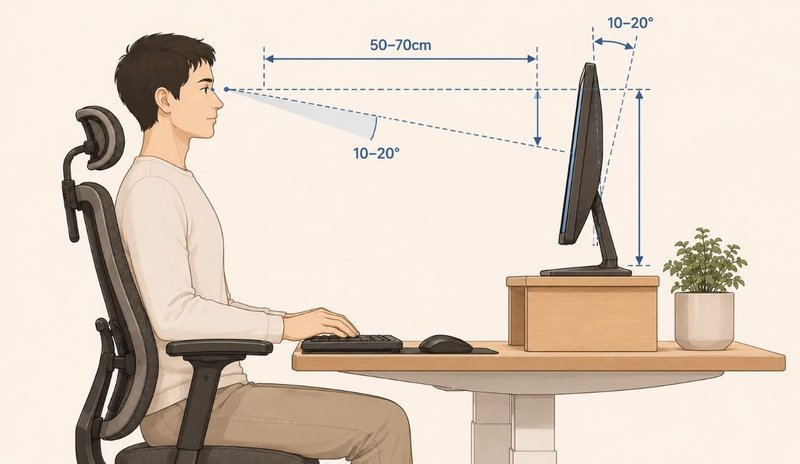
Workplace guidance on display screen equipment (such as the guidance used in many offices) points to the top of the screen sitting near or slightly below eye level, at roughly an arm’s length away. That is a practical starting point, not a fixed rule — your ideal position depends on your height, your chair, and your posture, and a slightly lower position is common if you wear progressive lenses. Write down how much height you need to gain, because that single number drives the whole decision.
Barrier 1: Where Does the Monitor Sit Today, and Where Do You Need It?
Sit at your desk in your normal working position. Look straight ahead and note where your eyes land relative to the top edge of your screen. If the top of the screen sits noticeably below your eye line, measure the vertical gap — from the top of the screen up to where your eyes are. That is the height you need to gain.
The goal is straightforward: position the top of the screen at or slightly below eye level, roughly an arm’s length from your face. This helps you view the screen without tilting your head forward or craning upward. If your screen already sits near that position, you may not need to add any height at all — and that is worth confirming before you buy anything.
- Gap is 0 to 1 inch: A fixed stand or a slim riser may be enough — or your current setup may already work.
- Gap is 2 to 4 inches: A monitor riser typically covers this range in one or two fixed steps.
- Gap is 5 inches or more — or changes throughout the day: A monitor arm gives you the range to dial in the right height and change it later.
Barrier 2: How Often Will You Change the Position?
Height is only half the picture. The other half is whether that height stays the same all day or changes with your working position.
- Static setup: You work seated at one height, your screen never moves, and your desk does not change. A fixed-height solution — a riser or a fixed stand — is usually enough, provided the height happens to match your measurement.
- Frequent adjustment: You alternate between sitting and standing, share the desk with someone of a different height, or switch between tasks that benefit from different screen angles. A monitor arm is worth the extra cost because it lets you reposition the screen in seconds without swapping hardware.
If you are unsure, lean toward a solution that gives you at least a little room to fine-tune. A fixed stand that is half an inch off cannot be adjusted; an arm or an adjustable riser can.
Match a Solution to Your Measurement
With your target height and adjustment needs written down, the solution type becomes clearer:
- You need continuous repositioning (sit-stand, shared desk, or a large height gap): a monitor arm gives you height, tilt, swivel, and depth — all adjustable on the fly.
- You need a fixed, modest rise (typically 2–6 inches) and the desk setup stays the same: a monitor riser adds height in fixed steps, often with storage underneath.
- You need a simple, low-cost height match and never move the screen: a fixed monitor stand holds the screen at one height and does nothing else.
Each type is described in detail below, evaluated against the measured goal — not against each other in a vacuum.
Monitor Arm: Continuous Repositioning for a Moving Setup
A monitor arm mounts to the desk with a clamp or a grommet mount and holds the screen with a VESA bracket. It is the only option of the three that gives you continuous, on-the-fly adjustment of height, angle, and depth. You can raise the screen, tilt it, rotate it between portrait and landscape, and in many cases pull it closer or push it back without adjusting anything else.
How it serves the measured goal
If your height gap is large (5 inches or more) or changes during the day, an arm covers the full range without swapping hardware. It also frees the desk surface that a riser would occupy, which matters if your desk is already tight on space.
When a monitor arm makes sense
- You change your sitting or standing position often.
- You want to free up desk surface that a riser would cover.
- You use two monitors and want them at the same height.
- Your monitor has standard VESA mounting holes.
What to watch
- Your monitor must have VESA mounting holes (usually 75×75 or 100×100) and its weight must fall within the arm’s rated range.
- Clamp mounts grip the desk edge — the desk needs to be sturdy enough and thick enough to hold the clamp without flexing. Clamps generally do not suit glass desktops, very thin veneer, or hollow-core panels.
- A grommet mount needs an existing hole in the desk and is an alternative if you cannot clamp.
Before choosing an arm, check your monitor’s weight and VESA pattern. An example is a dual monitor arm that fits 13–32 inch screens, supports roughly 4.4 to 17.6 lb per arm, and lets you tilt, swivel, and rotate the screen. A gas-spring dual arm like this is typically priced in the range of around USD 40–70, depending on capacity and build.
Monitor Riser: A Fixed Rise That Stays Put
A monitor riser is a platform that sits on the desk and raises the screen a fixed amount. It is the simplest option: you place it, set the screen on it, and you are done. Many risers double as storage, with a shelf underneath for a keyboard, paperwork, or accessories.
How it serves the measured goal
If your height gap is modest (typically 2–6 inches) and you work at one position all day, a riser hits the target height without any moving parts. It also adds storage without buying a separate unit, which is useful on smaller desks.
When a monitor riser makes sense
- You only need a modest, fixed height increase.
- You want extra storage without buying a separate unit.
- Your monitor does not have VESA mounting holes.
- You prefer not to clamp anything to your desk.
What to watch
- A riser gives you fixed height steps — not continuous adjustment. If your ideal height sits between two steps, you cannot fine-tune it.
- It occupies desk surface area. Measure your desk depth to make sure the riser and screen still leave room for your keyboard and mouse.
- A monitor riser is not the same as a standing desk converter. A riser only raises a screen and does not create a sit-stand work surface for keyboard and mouse use.
An example is a simple wooden or metal riser with legs that raises a screen a fixed height (often 4–6 inches) and leaves a shelf underneath. A riser like this is typically priced around USD 20–40 depending on size and materials.
Fixed Monitor Stand: One Height, No Adjustment
A fixed monitor stand sits at one height with no adjustment. It is the cheapest and most compact choice, and it works when your screen already sits close to the right height and you never move it.
How it serves the measured goal
If your screen needs little to no height correction — or you have already confirmed that the stand’s fixed height matches your measured gap — this is the simplest path to the goal. There is nothing to adjust and nothing to wear out.
When a fixed monitor stand makes sense
- Your screen is already near the right height and does not change.
- You want the smallest, lowest-cost solution.
- You use a laptop on a separate stand or do not move your screen.
What to watch
- Because it cannot be adjusted, a fixed stand is a good choice only when you have confirmed the height first. If you are not sure, a slightly adjustable option is more forgiving.
- There is usually no way to fine-tune the position, so it fits best when the height happens to suit you and your setup stays the same day to day.
A basic fixed monitor stand is typically priced around USD 10–25, making it the lowest-cost option of the three.
The Three Options at a Glance
| Option | What It Is | Height Range | Adjustability |
|---|---|---|---|
| Monitor arm | A mount that clamps to your desk edge | Wide, adjustable | Height, angle, and depth often gas-spring assisted |
| Monitor riser | A platform that sits on your desk | Fixed steps | Lift on and off between set heights |
| Fixed monitor stand | A support that holds the screen at one height | Single height | Minimal |
Your Measurement → Which Solution
Use the table below to match your measured height gap and adjustment needs to a solution type.
| Your Height Gap | Adjustment Need | Best-Fit Solution |
|---|---|---|
| 0–1 inch | Static, never moves | Fixed monitor stand (or no change needed) |
| 2–4 inches | Static, same position all day | Monitor riser |
| 2–4 inches | Occasional change (sit-stand) | Monitor arm (gives future flexibility) |
| 5+ inches | Any (static or frequent) | Monitor arm |
| No VESA holes | Any | Monitor riser or fixed stand |
| Two monitors, aligned | Any | Dual monitor arm or wide riser |
| Cannot clamp or drill desk | Any | Monitor riser or fixed stand |
Price Comparison
Prices vary, but as a general guide across the three categories:
| Type | Typical Price Range (USD) | What the Price Buys |
|---|---|---|
| Fixed monitor stand | ~10–25 | One fixed height, minimal footprint |
| Monitor riser | ~20–40 | Fixed-step height, often with storage |
| Monitor arm (single) | ~30–50 | Continuous adjustability, clamp or grommet mount |
| Monitor arm (dual, gas-spring) | ~40–70 | Two screens aligned, tilt-swivel-rotate per arm |
These are typical ranges, not firm prices, and they can shift with the supplier and current offers.
Decision Checklist
Before you choose, walk through these questions in order:
- Measure first. What is the gap between the top of your screen and your eye level? Write it down.
- Do I need to raise the screen at all? If the gap is near zero, the existing setup may be fine.
- Do I change sitting/standing position? A monitor arm is the most flexible; a riser or stand works for a static setup.
- Does my screen have VESA holes and what does it weigh? Needed for an arm; not needed for a riser or stand.
- Do I want storage or a clear desk? A riser adds storage; an arm clears the surface.
- Is my desk edge sturdy enough to clamp? Check material, thickness, and clamp range before choosing an arm.
- Do I use two monitors? A dual arm keeps them aligned; a wide riser can too.
Related Guides
Pair this with the laptop stand guide, learn the difference between a converter and a full standing desk, or set up the whole room with the ergonomic home office guide.