Last updated: September 2026 · Written by Hemi
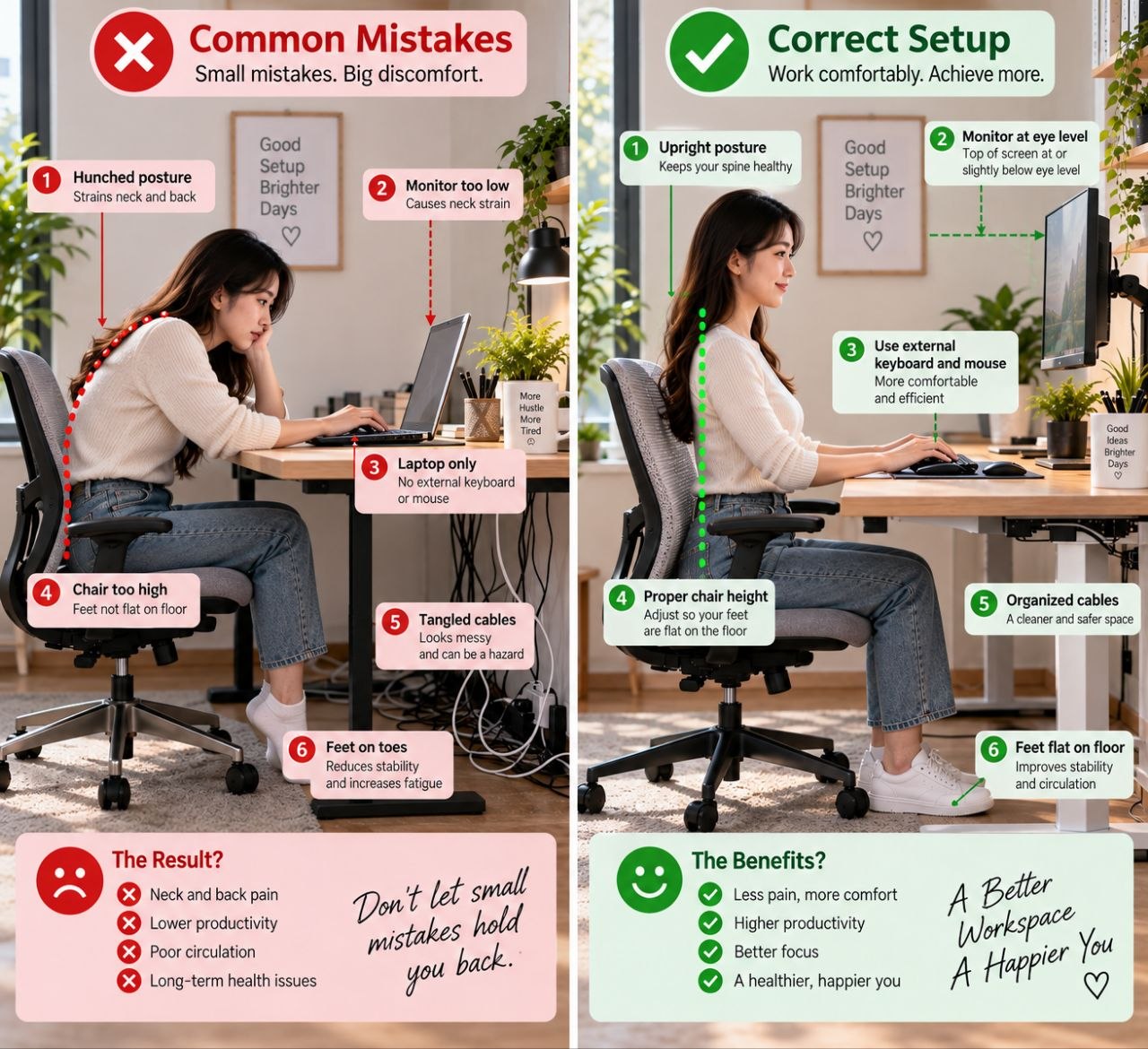
Most home-office discomfort is not mysterious. It traces to a short list of setup mistakes that repeat across apartments, bedrooms, and spare rooms. This checklist names the common failures and the first fix for each — without turning every fix into a shopping list. For a full workspace audit, use the complete setup guide linked below.
Mistake 1: Monitor Too Low or Too High
Symptom: neck flexed down toward a laptop, or tipped back toward an oversized display. First fix: raise or lower the screen so the top area sits near eye level, then sit normally and re-check. Books can trial a riser height before you buy anything.
Mistake 2: Chair Too Low or Too High
Symptom: shoulders shrugged toward a high desk, or hips cramped with knees above hips. First fix: set chair height for foot support and open hip angle, then see whether the desk still fits. If the desk is the immovable problem, consider foot support or a keyboard tray rather than endless chair fiddling.
Mistake 3: Keyboard Too Far Away
Symptom: reaching forward for long stretches, rounded shoulders. First fix: clear the near desk zone and pull the keyboard in. Keep the mouse at the same height when possible.
Mistake 4: No Task Lighting
Symptom: bright screen in a dim room, evening headaches. First fix: add or reposition a single task light; reduce harsh contrast before assuming you need a complex lighting system.
Mistake 5: Ignoring Cable Management
Symptom: constant snags, visual noise, difficulty cleaning. First fix: one under-desk zone for the power strip and adapters. Tidy is a comfort feature in small rooms, not only aesthetics.
Mistake 6: Sitting for Hours Without Breaks
Symptom: stiffness that no chair fully erases. First fix: short movement breaks on a timer. Equipment helps posture; it does not replace movement.
How to Use This List
Pick the mistake that matches your strongest symptom today. Fix that one fully before stacking purchases. The subtle-improvements guide covers smaller geometric tweaks once the obvious mistakes are handled.
Shop the Hemi Life pick
Single Monitor Arm / Monitor Stand — Check on Hemi Life.
Bottom Line
Most setups improve from correction, not collection. Name the mistake, apply the first fix, then decide whether any product is still necessary.
If several mistakes apply, order fixes by pain location: neck → screen height; shoulders/wrists → desk and keyboard height; eyes → lighting and contrast; general stiffness → breaks and movement.
Avoid fixing everything with shopping cart tabs open. One corrected mistake teaches you more than three simultaneous untested purchases.
Photograph your setup from the side. Side photos reveal hunching and screen height faster than front-facing desk pics on social media.
Revisit the checklist after any major furniture change. A new chair can reintroduce old mistakes if desk and monitor are not retuned.
Share the checklist with anyone who uses the same desk. Shared spaces accumulate mistakes from conflicting adjustments — one person raises the chair, another lowers the monitor, nobody resets the baseline.
After travel or a week away, run the six mistakes quickly. Setups drift when you return and “just make it work” for the first busy Monday.