Last updated: August 19, 2026
Building a functional home office in Singapore does not require a big budget — but it does require a plan. With smart choices and a clear allocation, $200 is enough to build a workspace that supports your comfort and productivity.
Last updated: August 19, 2026
This guide shows you exactly where to allocate your budget, what to buy, and what to skip.
The Budget Philosophy
The key to a budget home office is simple: spend on what affects your body, save on everything else.
Before you buy anything: Look around your home. You may already have a table, chair, or lighting that works. Start with what you own, then fill gaps strategically.
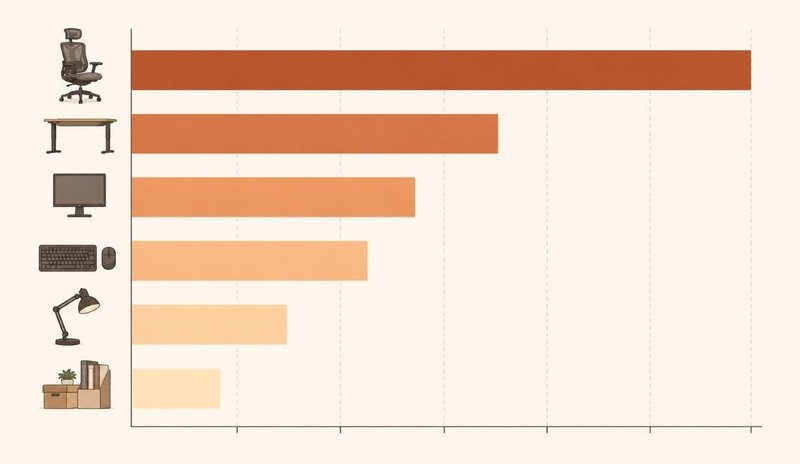
Where your $200 could go (adjust based on what you already have):
- Chair: $80-120 — affects your posture and comfort during long sessions
- Desk surface: $0-60 — affects your working height and space
- Monitor setup: $0-50 — affects your eye comfort
- Keyboard and mouse: $25-40 — affects your wrist comfort
- Lighting: $15-25 — affects visual comfort during screen use
- Organization: $0-20 — affects your workflow
What to skip entirely:
- Full electric standing desks (over $300 — a sit-to-stand converter riser is the budget-friendly standing option)
- Premium monitor arms (books and boxes work fine for a starter setup)
- Expensive desk organizers (use what you have)
- Premium accessories (focus on essentials first)
The Chair — Where to Spend
For many people, the chair is one of the higher-priority purchases. A poorly adjusted chair can contribute to discomfort and reduced productivity over time.
Best budget options under $100:
- Amazon Basics Mid-Back Office Chair (typical price: $60–80)
- Adjustable height
- Lumbar support
- Breathable mesh
- Suitable for extended use
- SHW Ergonomic Office Chair (typical price: $80–100)
- Adjustable armrests
- Mesh back
- Seat depth adjustment
- Good value in this range
- Used or refurbished office chairs (typical price: $30–60)
- Check Facebook Marketplace
- Office liquidation sales
- Thrift stores
- Look for brand-name chairs being discarded
What to look for:
- Adjustable height (important)
- Lumbar support (helpful)
- Seat depth adjustment (nice to have)
- Breathable material (comfortable for long sessions)
Quick fixes for an existing chair:
- Ergonomic lumbar cushion ($59.90)
- Seat cushion (typical price: $20)
- Armrest pads (typical price: $15)
The Desk — Budget Options
You don’t need a fancy desk. You need a flat surface at a comfortable height.
Free options:
- Dining table (many homes already have one)
- Existing table or counter in your home
Budget new desks:
- IKEA LINNMON tabletop with ADILS legs (typical price: $50 total)
- Simple folding table (typical price: $30–50)
DIY workspace option: An IKEA KALLAX shelf with tabletop (typical price: $70–90 total) placed on top creates a sturdy, fixed-height workspace at a budget-friendly price. Measure carefully to ensure the height works for seated use with your chair.
Want a higher screen without a new desk? A Monitor Stand Riser 3-Height Adjustable ($89) is a fixed-height riser that raises a monitor or laptop to a more comfortable viewing height on an existing desk. It does not convert the desk to a sit/stand workstation — for that, a dedicated standing desk converter is the product to consider. It remains a practical, budget-friendly upgrade once your basic setup is in place.
Monitor Setup — Smart Choices
Your monitor affects your eye and neck comfort. You don’t need to overspend, but a reasonable screen makes a difference.
Option 1: Use your existing TV ($0)
- Most TVs work as monitors via HDMI
- Set resolution to 1080p
- Sit at a comfortable distance
Option 2: Budget monitor (typical price: $80-120)
- Acer 21.5 inch (typical price: $80)
- LG 24 inch (typical price: $100–120)
- Dell 22 inch (typical price: $90–110)
- IPS panels offer better color and viewing angles
Option 3: Laptop with external keyboard (typical price: $0–30)
- Use your laptop screen as the monitor
- Add an external keyboard (typical price: $25)
- Use an Adjustable Aluminum Laptop Stand ($34) to raise the screen
Monitor height alternatives (free):
- Stack of books
- A box
- A portable monitor bracket ($109.90) for adjustable height and angle
Keyboard and Mouse — Don’t Overspend
A decent keyboard and mouse combo works well for most people. You don’t need to spend a lot here.
Budget keyboard and mouse combos:
- Logitech MK270 Combo (typical price: $25–30) — wireless, reliable
- Amazon Basics Keyboard (typical price: $15) — wired, simple
Budget mechanical keyboard (if you prefer the feel):
- Redragon K552 (typical price: $40) — good for heavy typing
Budget mouse options:
- Logitech M185 (typical price: $15–20) — wireless, comfortable
- Amazon Basics Mouse (typical price: $10) — wired, basic
Skip for now: Gaming mice, specialized ergonomic mice (unless you have specific wrist concerns)
Lighting — Free and Cheap Solutions
Good lighting can help reduce visual discomfort during prolonged screen use. It doesn’t have to be expensive.
Free solutions:
- Position your desk near a window for natural light
- Remove or adjust curtains during work hours
- Use your room’s overhead light
Budget desk lamps (typical price: $15-25): For an affordable option under $50, see our LED Smart Desk Lamp with Wireless Charger ($39.90), or browse the full Lighting collection.
- LEPOWER LED Desk Lamp — adjustable brightness, flexible neck
- TaoTronics LED Lamp — multiple color temperatures
What to avoid:
- Flickering lights
- Lighting that creates glare on your screen
- Lights that are too harsh or too dim
Organization — Zero Cost Options
Most organization solutions are free if you’re creative with what you already have.
Free cable management: For a tidy desk edge under $10, try our Silicone Cable Organizer ($9.90).
- Binder clips on desk edge to hold cables
- Toilet paper rolls to organize cables
- Tape to secure cables to desk
- Twist ties to bundle cables
Free desk organizers:
- Shoe box as a paper holder
- Mug as a pen holder
- Mason jar for small items
- Magazine file for documents
Budget organizers if needed (typical price: $10–20):
- Drawer organizer
- Cable management box
- Desk organizer tray
Complete Under-$200 Setup Examples
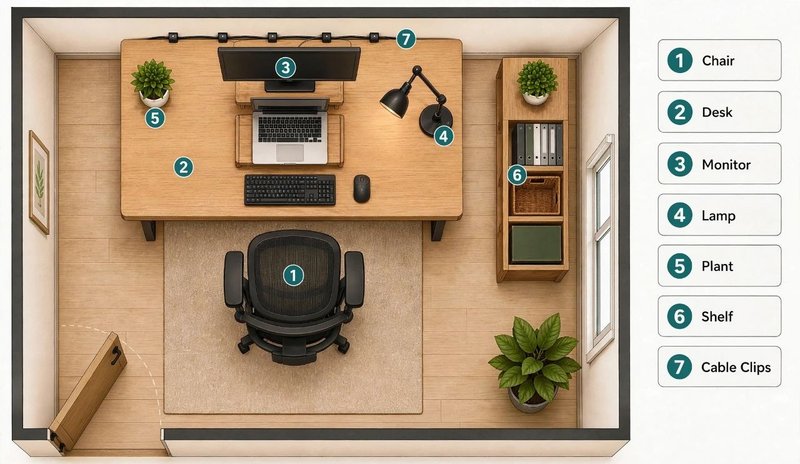
These three examples show how to build a functional workspace while staying within budget. Adjust based on what you already own.
Example 1: Basic Remote Work Setup
| Item | Typical Price |
|---|---|
| Amazon Basics Chair | $70 |
| IKEA LINNMON Table + ADILS Legs | $50 |
| Logitech MK270 Combo | $28 |
| TV as monitor | $0 |
| LEPOWER Desk Lamp | $20 |
| Cable clips | $5 |
| Total | $173 |
Example 2: Student Study Setup
| Item | Typical Price |
|---|---|
| Used office chair | $40 |
| Existing dining table | $0 |
| Acer 21.5 inch Monitor | $80 |
| Amazon Basics Keyboard | $15 |
| Logitech M185 Mouse | $18 |
| Desk lamp | $20 |
| Cable ties | $5 |
| Total | $178 |
Example 3: Budget-Friendly Upgrade Setup
| Item | Typical Price |
|---|---|
| SHW Ergonomic Chair | $85 |
| IKEA MICKE Desk | $50 |
| Logitech MK270 Combo | $28 |
| Monitor riser (books) | $0 |
| LEPOWER Desk Lamp | $20 |
| Cable management | $10 |
| Total | $193 |
Where to Buy
Best budget sources:
- Amazon — widest selection, check Amazon Warehouse for open-box deals
- IKEA — best desks and organization solutions
- Walmart — budget chairs and accessories
- Facebook Marketplace — used chairs and desks at low prices
- Thrift stores — hidden gems for furniture
- Office liquidation sales — brand-name chairs at discount prices
Budget tips:
- Look for “Used – Like New” options online
- Wait for sales events
- Buy floor models at furniture stores
- Check local classifieds regularly
What to Upgrade Later
Once your budget allows, consider upgrading in this order:
- Chair — if you started with a basic one
- Desk — if you’re using a temporary surface
- Monitor — if you’re using a TV or laptop screen
- Keyboard and mouse — if current ones are uncomfortable
- Lighting — if current setup causes visual strain
A budget setup used with proper ergonomics can work very well. Upgrade gradually as your needs become clearer.
Your Next Steps
- Check what you already have — table, chair, monitor, lighting
- Decide your budget allocation based on what you need most
- Shop smart — compare prices across Amazon, IKEA, and used options
- Set up properly — follow the ergonomic guide for correct positioning
- Upgrade gradually — add quality over time as your budget allows
This guide is part of Hemi Life’s Home Office Setup series. We help remote workers create practical, comfortable, and affordable workspaces.
Related Guides
- Complete Ergonomic Home Office Setup Guide
- Ergonomic Chair vs Regular Chair
- Standing Desk Converter vs Full Standing Desk
Ready to Upgrade?
When you are ready to add budget-friendly upgrades from the Hemi Store, the Ergonomics collection brings together the accessories referenced in this guide. As always, start with what you already own, then fill gaps only where it helps your comfort.
Working with a tighter limit? The under-$150 setup breakdown shows which purchases to defer when you can reuse existing furniture.