
Last updated: August 2026 · Written by Hemi
The Comparison Your Title Promises — and What Actually Varies
An ergonomic mouse is a pointing device shaped to keep your hand and forearm in a more neutral, relaxed position — closer to a handshake than the flat, palm-down grip of a conventional mouse. Instead of twisting your forearm to face the desk, your hand rests at an angle that reduces pronation and keeps the wrist in a straighter line with the forearm.
A regular mouse is compact, familiar, and well-suited for precision work. It asks your forearm to stay in a continuously pronated position. An ergonomic mouse changes that starting posture — and that is where the design conversation begins.
Plenty of marketing around ergonomic mice reads like a cure claim. The reality is more measured: an ergonomic mouse can change your starting hand position, but it cannot fix everything that contributes to wrist or forearm discomfort on its own. The honest question is not “which is better” — it is “which fits how you actually use a mouse, and what trade-off are you willing to make?”
This article separates the real trade-offs from the myths, so the “vs” in the title means something.
Why Hand Position Matters
When you use a conventional flat mouse, your palm faces downward. In this position — called pronation — the two bones in your forearm (the radius and ulna) twist across each other. The muscles that control this twist, particularly the pronator teres, stay engaged the entire time your hand is on the mouse.
A vertical ergonomic mouse lifts your hand into a “handshake” position, where the palm faces inward at roughly a 60–90° angle. In this posture, the radius and ulna run more parallel, the wrist sits closer to neutral, and the forearm muscles are under less continuous tension. Some studies suggest that this neutral position can reduce muscle activity in the forearm and wrist, though individual results vary and a mouse alone does not treat or prevent any medical condition.
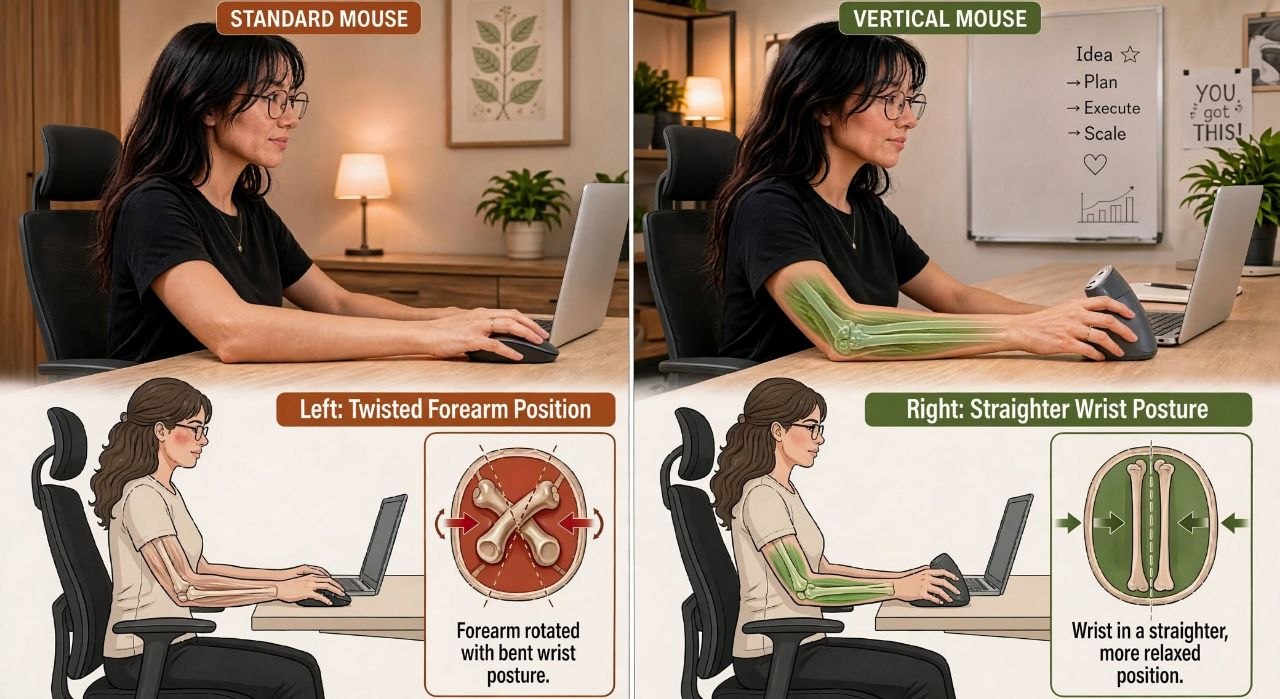
| Aspect | Regular Mouse | Vertical Ergonomic Mouse |
|---|---|---|
| Hand Position | Flat (pronated) | Handshake (neutral) |
| Forearm Rotation | ~90° pronated | ~10-20° pronated |
| Wrist Extension | Often extended | Neutral |
| Muscle Activity | High (pronator teres, flexors) | Low (neutral posture) |
If you have persistent wrist, hand, or forearm symptoms, a change of mouse should not be treated as a substitute for professional medical advice.
How the Main Designs Differ
Ergonomic mice are not all the same shape. The main categories differ in how far they rotate the hand and what trade-offs come with that angle:
| Design | Hand Position | Best For | Trade-offs |
|---|---|---|---|
| Vertical | Handshake (90°) | Long sessions, wrist comfort | Learning curve, larger size |
| Angled / Semi-vertical | 45–60° | Balance of comfort and familiarity | Moderate learning curve |
| Contoured / Sculpted | Slightly angled | Precision work, familiar feel | Less forearm rotation benefit |
| Regular / Flat | Flat (pronated) | Gaming, precision, portability | Higher forearm pronation |
What This Means for You in Practice
Understanding the hand-position difference is one thing; living with a new mouse shape is another. Here is what most people notice when they make the switch.
The Learning Curve
Switching from a flat mouse to a vertical one can feel unfamiliar at first. Cursor control may feel different, and the handshake grip requires a brief adjustment period. Most users find the new position comfortable within a few days to a couple of weeks, but adaptation time varies by person.
- Lower the DPI initially (800–1200) for smoother control
- Practice basic tasks — clicking, dragging, scrolling — for 15–30 minutes daily
- Keep the mouse close to the keyboard to avoid reaching
- Adjust DPI and pointer speed in your OS settings to match your preference
- If discomfort persists beyond a few weeks, reassess the mouse size or shape
Precision and Task Fit
A vertical mouse is well-suited to general office work, browsing, and document editing. For tasks that demand pixel-level precision — such as detailed design work, CAD, or competitive gaming — a conventional or contoured mouse may offer finer control. There is no single shape that is best for every task.
Hand Size and Left-Handed Users
Hand size matters. A vertical mouse that is too large or too small for your hand can feel awkward and reduce the benefit of the neutral posture. Compact vertical mice (under 100 g, under 11 cm length) tend to suit smaller hands, while larger shells suit bigger hands. Check the product dimensions before buying.
Left-handed users face an additional consideration: true left-handed vertical mice are less common than right-handed designs. If you are left-handed, verify the product shape carefully — some designs labelled “ergonomic” are still contoured for right-hand use — and consider ambidextrous alternatives where appropriate.
One Representative Example — and What It Illustrates
To show what a full vertical mouse looks like on paper, here is one representative HemiLife option with its published specifications. Specifications are drawn from published product information; they are an illustration of the category, not a ranking.
Working Example: Vertical Rechargeable Wireless Mouse
Vertical Rechargeable Wireless Mouse — $99.00
- Shape: Full vertical, handshake grip
- Connection: Wireless (2.4 GHz / Bluetooth)
- Sensor: Optical, adjustable DPI
- Buttons: 5 programmable buttons
- Battery: Rechargeable via USB-C
- Weight: ~135 g
- Best for: Full-day office use, users wanting full vertical support
Within the same vertical-mouse category, other designs differ mainly by grip angle (full vertical vs angled), size, and battery approach. The right choice among them depends on your hand size and how much vertical angle you actually want — not on any single “best” model.
What This Means for Your Decision
The honest “vs” splits two legitimate needs:
- If your priority is precision, familiarity, and low cost: a regular flat mouse is a legitimate choice. It is compact, widely understood, and the lowest-friction option for people who switch between tasks or share a desk. The trade-off is the continuously pronated forearm position — a cost most people notice only after long sessions.
- If your priority is a more neutral hand position: a vertical or angled ergonomic mouse changes your starting posture. For some people that means less forearm tension during long sessions. The trade-offs are a learning curve (precision and speed often dip briefly at first), a different feel that is not for everyone, and — at the higher end — a higher price for designs that may not be worth it for your use.
- If you are buying to solve a medical problem: an ergonomic mouse is a tool that can support a better position. It is not a cure, and it cannot fix problems caused by chair height, screen position, typing habits, or how long you sit. Treat it as one piece of a setup, not a fix.
That is the real comparison the title points to. Different hands, different tasks, and different budgets land on different sides — and that is a feature of the category, not a failure of it.
If your setup issue is not just the mouse, see our ergonomic keyboard vs regular keyboard guide for the adjacent input-device decision.